Wedding Welcome Sign Laser Cut File
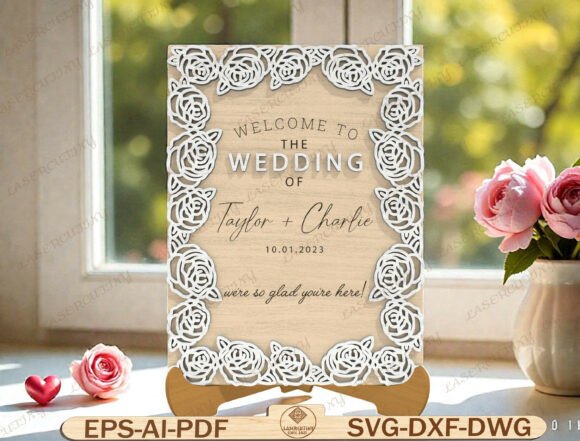
Creating a memorable entrance for your special day often comes down to the smallest details. A wedding welcome sign laser cut file offers a sophisticated way to greet guests while setting the romantic tone for the entire event. This digital resource provides a layered design featuring an intricate rose floral border frame that surrounds personalized couple names and a wedding date. Unlike generic printed signs, this specific format is engineered for precision cutting on wood or acrylic, delivering a dimensional effect that elevates your decor from simple to stunning.
However, purchasing a digital download involves more than just clicking "buy." Many creators and small business owners find themselves frustrated when their final project doesn't match the vision because they overlooked critical technical details. To ensure your rose border wedding plaque turns out exactly as intended, it is essential to understand the nuances of vector files, material compatibility, and software requirements before you begin your project.
Understanding the Digital Format and Compatibility
The first mistake many people make is assuming all digital files are created equal. When you acquire this wedding welcome sign laser cut file, you are receiving high-quality vectors in SVG, DXF, AI, EPS, PDF, and DWG formats. These are not standard image files like JPEGs; they are mathematical paths that tell your machine exactly where to cut. If you attempt to use these files with software that does not support layers or complex vector paths, the result will be a mess.
While this design is compatible with major brands like Glowforge, xTool, OMTech, and Thunder Laser, it also works with CNC routers and hobbyist machines like Cricut or Silhouette. The key is ensuring your software version matches the file complexity. For instance, using a basic version of Cricut Design Space without importing the correct SVG might cause the machine to treat the intricate rose frame as a single solid shape rather than separate layers, ruining the dimensional effect. Always verify that your software can open layered files if you intend to create depth by cutting different materials for the text versus the background.
Selecting the Right Materials for Dimensional Effects
A common pitfall in creating floral frame wedding decor is selecting a material that cannot hold the fine details of the rose border. Because this design features an intricate floral pattern, thin or brittle materials may break during the cutting process or fail to hold the delicate curves of the petals. Wood thickness is particularly important here. If you choose plywood that is too thick, the laser might struggle to cut through the tight corners of the flowers, leading to burnt edges or incomplete cuts. Conversely, if the material is too thin, the sign may lack the structural integrity needed for a sturdy welcome display.
To avoid this, test your settings on a scrap piece of your chosen material before committing to the final sign. For a classic and elegant look, 1/4-inch or 3/8-inch birch plywood is often ideal, offering enough body to stand up on its own while allowing the laser to carve the roses cleanly. Acrylic is another excellent choice for a modern twist, but it requires specific speed and power settings to prevent melting or cracking around the detailed floral sections. Remember, the goal is a clean edge that highlights the contrast between the frame and the personalized name layout.
Customization Pitfalls and Typography Choices
The ability to customize names and dates is a major selling point of this wedding welcome sign laser cut file, but it introduces a new set of potential errors. Many users assume they can simply type any font into their design software and expect it to cut perfectly. However, cursive fonts often contain tiny loops and connections that can be difficult for a laser to cut, especially at smaller sizes. If the gap between letters is too narrow, the laser might burn through the letter itself, or the cut lines might merge, making the names illegible.
To ensure your custom name wedding sign looks professional, stick to fonts that are designed for signage or have been tested for laser cutting. If you are using a script font, consider slightly increasing the kerning (spacing) between letters to prevent them from touching. Additionally, always check the orientation of the text within the design layers. In some layered files, the text might be grouped with the background, requiring you to ungroup and reposition elements before cutting. Failing to do so can result in the names being cut out of the wrong piece of material, forcing you to start over.
Assembly and Structural Integrity
Once the pieces are cut, the assembly phase is where many enthusiasts overlook the importance of alignment. Since this design relies on a layered approach to create a romantic wedding decoration with depth, the pieces must fit together precisely. If your laser cutter has drifted or the material shifted during cutting, the rose frame might not align perfectly with the central nameplate. This misalignment can be obvious and detract from the overall elegance of the reception display.
A practical solution is to use registration marks if your machine supports them, or to carefully tape the layers together before the final cut to ensure they don't shift. Another common error is ignoring the grain direction of wood. Cutting across the grain in certain areas might make the sign prone to splitting, especially around the delicate flower stems. Aligning your design so that the long, continuous parts of the frame run parallel to the wood grain adds significant strength and reduces the risk of breakage. For a truly polished look, sanding the edges lightly after cutting removes any char marks and ensures a smooth finish.
Evaluating Your Purchase Before Downloading
Before finalizing your purchase of a wedding welcome sign laser cut file, take a moment to review the specifications provided by the seller. Ensure the file includes all necessary layers for the frame, text, and date. Some sellers provide simplified versions that omit the detailed rose border, which defeats the purpose of buying a premium design. Verify that the file size is manageable for your computer, as extremely large vector files can crash older software versions.
Furthermore, consider your end-use scenario. If you are producing these signs for a small business to sell as anniversary keepsake plaques, you need to know the licensing terms. Most digital downloads allow for personal use, but commercial use often requires a specific license. Ignoring this distinction can lead to legal issues down the road. By taking the time to read the fine print and understanding the technical requirements, you ensure that your investment results in a beautiful, functional, and legally sound product.
Ultimately, the success of your wooden floral wall decor project depends on preparation. Whether you are a seasoned maker or a beginner looking to add a personal touch to a bridal shower sign, paying attention to material selection, software settings, and customization details will save you time and money. With the right approach, this wedding welcome sign laser cut file becomes more than just a decoration; it transforms into a cherished memory of your special day.